The AP Aging report shows all open accounts payable transactions, including credit memos that haven't been applied to an invoice yet. Transactions are grouped into day ranges, so you can see which invoices are current and which are past due. Each transaction is hyperlinked, so you can open it and review its details. For more on running the report, see AP Aging.
Conditions in which UNASSIGNED VENDOR appears on AP Aging Report
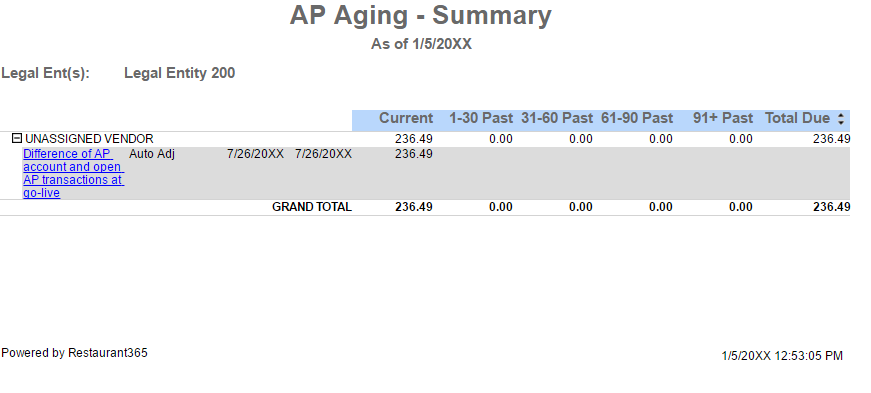
The UNASSIGNED VENDOR is a system-generated vendor that appears on the AP Aging Report when the following conditions occur.
Difference in AP Beginning Balance and Imported AP Invoices at Cut Over
A difference exists between the AP Beginning Balance (the opening balance for the Accounts Payable GL account) and the sum of all imported Open AP Invoices Beginning Balance transactions (AP Invoice - Beginning Balance transactions that were imported at cut-over). In addition to appearing on the AP Aging report, the System Setup tab is present in the To Do Checklist, indicating that the AP Beginning Balance does not equal the sum of Open AP at cut-over.
Ensure that all Beginning Balance Transactions are dated prior to your Go-Live Date.

Journal Entry Coded to Accounts Payable
A journal entry (non-beginning balance) directly codes a dollar amount to the Accounts Payable GL Account. Coding directly to AP is not recommended as the amount will never be removed from the AP Aging Report. Any AP transactions that need to be recorded in Restaurant365 should only be entered via the AP Invoice, AP Payment, and AP Credit Memo transaction types.

Removing values from the UNASSIGNED VENDOR
UNASSIGNED VENDOR should not remain in Restaurant365 and acts as a placeholder. In each scenario above, the necessary steps to remove any balance from the UNASSIGNED VENDOR need to be taken as soon as possible for accurate AP Aging. If journal entries continue to post directly to Accounts Payable, their respective balance will reside on the AP Aging Report indefinitely.
Difference in AP Beginning Balance and Imported AP Invoices at Cut Over
The AP Beginning Balance is adjusted. The required adjustment depends on the sign of the Auto Adj value on the UNASSIGNED VENDOR.
If the Auto Adj value is Negative (negative sign in front of the value) the required adjustment is one of the following:
Adjust the existing GL Account Beginning Balance Journal Entry until the GL Beginning Balance is equal to the Open AP Beginning Balance
Delete the excess/offending Open AP Beginning Balance Transactions until the values are in balance
If the Auto Adj value is Positive (no negative sign in front of the value) additional Beginning Balance AP Invoice transactions need to be added until the values are in balance
To create a new beginning balance transaction, open the Admin application, expand the Accounting category, select the desired beginning balance transaction.

Journal Entry Coded to Accounts Payable
The journal entries that contain the Accounts Payable GL Account are unapproved and deleted, then replaced with AP Invoice transactions.

